Showing posts with label Computer n Internet. Show all posts

23 September 2010

Gmail...

Bagi yang ada akaun Gmail, korang perasan tak yang Gmail sekarang banyak feature baru. Kat sini aku nak cerita pasal salah satu feature yang menarik iaitu themes.

Tengok aku punya akaun, bila dah tukar theme, cantik tak?


Camana nak buat? Korang klik setting tu, pastu select Themes macam kat bawah ni...


Bila dah klik tu, akan keluarlah list themes, So, korang bolehlah pilih themes mana yang korang berkenan. Kalau nak selalu berubah, select Random je, nanti akan berubah-ubah setiap kali korang login ke email.


Selamat mencuba!


Share/Bookmark


Nak duit lebih? Jom jana pendapatan. KLIK SINI

09 August 2010

Sesuatu disebalik logo Yahoo!

Anda sudah tentu familiar dengan Search Engine Yahoo kan? Sebenarnya ada sesuatu disebalik logo Yahoo itu sendiri. Cuba anda klik pada bahagian ! seperti gambar di bawah. Maksud saya anda perlu ke website http://www.yahoo.com/ kemudian pada bahagian logo seperti di bawah, anda perlu klik tanda !.


Yang penting anda perlu buka speaker PC anda kuat-kuat. Anda boleh dengar suara misteri :D
Mungkin sudah ramai yang tahu…tapi saja nak kongsi juga.


Share/Bookmark


Nak duit lebih? Jom jana pendapatan. KLIK SINI

30 June 2010

Nak add friends pun tak boleh

Hahahaha! Makin bangang Facebook ni. Dah kena block plak nak add or accept friends.


Share/Bookmark


Nak duit lebih? Jom jana pendapatan. KLIK SINI

26 June 2010

Perkara yang aku paling benci dengan Facebook

Boleh dikatakan semua orang yang daftar Facebook sebab nak cari teman-teman lama. Tapi benda tu jugak menyakitkan hati aku. Kenapa ya?

Aku tau teman-teman lama aku mungkin atau pasti kata aku seorang yang biadap! Sebab aku 'outspoken' kat Facebook. Setakat maki hamun orang dengan perkataan 'bodoh, fuck, stupid, asshole dan lain-lain tu memang biasa bagi aku. Tapi hanya kepada teman-teman lama yang pernah mengenali aku sejak di bangku sekolah rendah. Kenapa ya?

Sedangkan aku boleh 'be manner' dengan orang yang aku baru kenal, teman-teman kerja. Kenapa ya?


Jawapan kepada 'KENAPA YA?'

1. Sebab aku bukan seperti kanak-kanak atau remaja di bangku sekolah. Aku tau zaman aku sekolah, aku seorang yang bersopan, mudah mengalah tapi tidak sekarang, kerana aku seorang yang agresif, aktif, ligat. Jangan samakan aku dengan zaman lampau yang korang kenal, mudah dibuli atau sebagainya. Aku kini self-protective, mempertahankan hak aku!

2. Sebab teman-teman lama suka menjaga tepi kain orang. Aku paling pantang orang yang mesej aku tanya kenapa aku online setiap masa, asyik main game. Tak berfaedah katanya. Hei, aku tak peduli. Ini hak aku. Aku tak pernah mintak sedekah diorang untuk bayar bil internet aku even bil elektrik. Malah aku pernah bagi ilmu internet kat diorang tanpa mintak satu sen pun. So, aku rasa diorang memang tak layak nak ambil tahu apa yang aku buat. Ini hak aku!


3. Sebab aku rasa diorang ni suka berlakon baik. Baiklah sangat. Pantang nampak penulisan lucah dari aku sikit, terus nak provoke~ nasihat macam-macam! Padahal tak baca apa cerita disebaliknya. Mana aku tak kata bodoh padahal explaination depan mata!


So, kalau ada teman-teman lama aku kat Facebook baca entry aku ni, kalau terasa tu, aku peduli apa. You are welcome to remove me from your friendlist and ignore me. Bukan aku pun yang add korang. Ada aku kisah??????????


Ikhlas dari,

AKU YANG BIADAP BERTEMPAT
bukan bermakna aku seorang yang jahat!!!


Share/Bookmark


Nak duit lebih? Jom jana pendapatan. KLIK SINI

22 June 2010

Hati hati semua dengan FACEBOOK !

First of all, sorry Ben Ashaari, aku copy paste dari blog ko. Malas nak karang... Untuk kebaikan kita bersama juga...


Hati-hati !!Mulai sekarang jangan pernah menuliskan kata2 yang 6 huruf yaitu I5Ra3L (tulisan biasa) di WALL, di Status, di Note atau saat mengupload apa saja, karena secara otomatis anda akan langsung masuk ke fans page ini TAPI JANGAN DI LIKE :

http://www.facebook.com/pages/Israel/108099562543414?v=stream&ref=ts

Coba lihat..!! Sudah banyak saudara kita yang masuk fans page itu... Padahal mereka tak bermaksud untuk gabung..Mungkin Anda juga termasuk dari mereka yang telah tergabung tanpa disengaja.. Waspada dan segera untuk keluar karena jumlah anggota mereka setiap jam bertambah,

jika kita menulis nama negara itu sesuai aslinya maka informasi itu akan di direct ke page 15r43L dan dimonitor sama mereka disana, semua postingan yg mengandung kata 15r43L ada disana juga

Sebarkan vm ini ke saudara2 kita yang lain.. Karena kita bukan pengikut the real terorist..

Saya melihat mungkin anggota grup ini yang wall/note//tautan yang masuk ke dalam fans page itu, hati-hati ya..
tolong disebarin.
syukron.

(sumbEr dri group bErjuanglah, rEmaja islam!!)


Share/Bookmark


Nak duit lebih? Jom jana pendapatan. KLIK SINI

10 April 2010

Awesome Screen Saver

Aku dah lama mencari screen saver ni, mana bleh dapat ah? Korang boleh carikan untuk aku tak?


Share/Bookmark


Nak duit lebih? Jom jana pendapatan. KLIK SINI

30 March 2010

Tutorial: ESET NOD32 ID & Password update

Hari ni aku nak kasik tutorial sikit pasal nak update ID ngan password antivirus ESET NOD32. Ramai geng-geng aku pakai ESET NOD32 sebab aku yang tolong install dan bagitau diorang kalau nak update ID ngan password, link ada aku letakkan kat blog aku ni. Tapi masalah timbul bila antivirus ESET NOD32 ini sendiri yang block bila nak access ke link tu so, bagi yang noob memang tak tau nak buat apa... Haha! Padan muka! Reti pakai je tak reti nak explore.

Aku taknak membebel, cuma aku nak bagitau cara nak access ke link/site tu dan update ESET NOD32 ID dan password. Mudah saja, ikut step kat bawah ni:

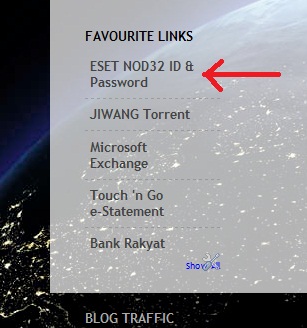
1. Korang boleh tengok kat bahagian FAVOURITE LINK aku ada link ESET NOD32. Korang boleh klik kat situ.


2. Bila dah klik, mungkin korang akan face problem takleh nak access sebab kena blok ngan antivirus. Jangan panik, mudah je...


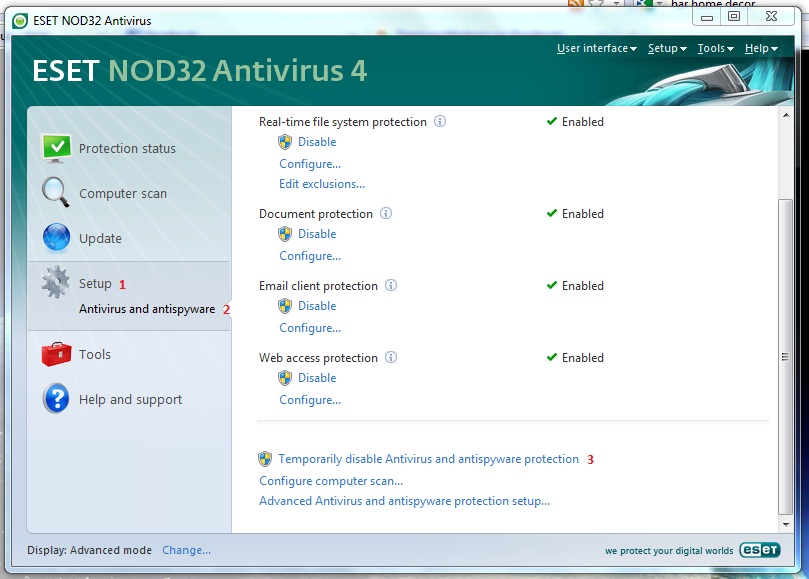
3. OK, bila dah dapat mesej macam kat atas ni, korang open antivirus dan ikut step nombor dalam gambar bawah ni. Disable antivirus untuk sementara waktu sementara korang nak masuk ke website tu untuk dapatkan ID dan password baru.


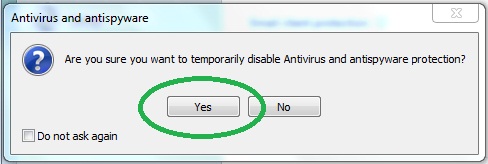
4. Bila korang dah klik untuk disable tu, popup akan keluar, tekan YES je....

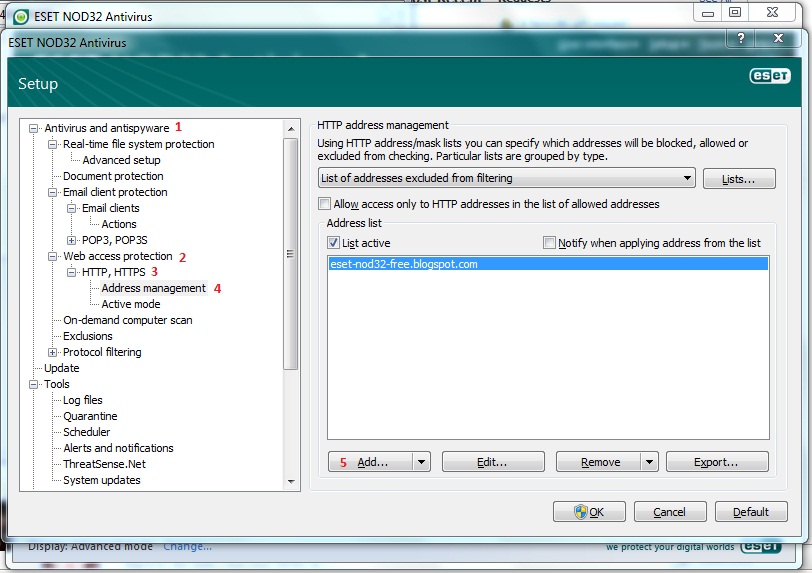
5. Ada 1 cara lagi yang korang boleh buat kalau taknak disable antivirus. korang bukak antivirus, tekan F5 dan ikut step nombor pada gambar kat bawah ni.


6. Bila dah tekan button ADD tu, popup akan keluar dan korang isi ni: eset-nod32-free.blogspot.com dan address tu akan masuk ke kotak. Tekan OK. Dah pun siap. So, next time tak perlu lagi nak disable dan enable.


7. Haa..... dah boleh access pun... So, kat website ni listing banyak ID dan password yang korang boleh pilih mana yang korang nak...


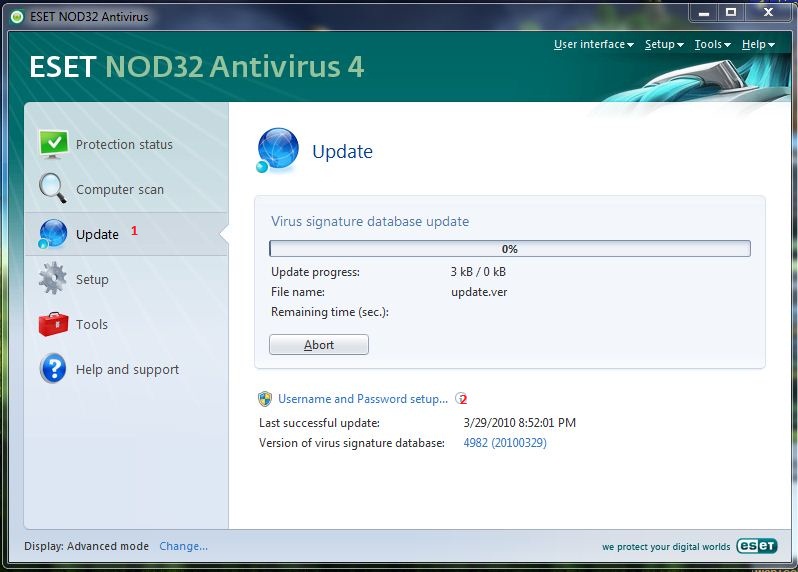
8. Dah pilih tu, korang copy satu-satu. ID dulu dan kemudian password dan masukkan ke tempat seperti dalam gambar kat bawah ni


9. Dah pun siap... Cubalah update dulu sebelum tutup antivirus tu kot-kot ID dan password yang korang pilih tu dah expired. Kalau dah expired, ulang step 8 sampai dapat update. ID dan password kat site ni dikeluarkan pada setiap hari. Jadi kalau antivirus korang expired, masuk je ke site ni dan update.


Selamat mencuba! Selamat berjaya!


Share/Bookmark


Nak duit lebih? Jom jana pendapatan. KLIK SINI

19 December 2009

Welcome new speed

Baru-baru ni aku ada terima satu email pasal promosi TMNet mengenai Super Upgrade Deal. Aku memang rasa macam nak upgrade tapi aku agak malas nak gi TMPoint untuk buat penaiktarafan. Luckily semalam masa aku surfing, aku terbaca 1 link mengenai pakej ni dan bila aku ushar-ushar rupanya boleh upgrade online. Terus tak buang masa, aku pun apalagi, terus isi maklumat yang diperlukan dan submit.

Untuk pengetahuan line asal aku adalah 512k without modem (RM66 per month) dan aku ambik pakej Super Deal 6 iaitu upgrade ke 1mb yang mana untuk 4 bulan pertama aku hanya perlu bayar RM66 dan bulan ke-5 dan seterusnya adalah RM71. RM5 je tambahan, cuma kontrak je laa kena sambung 24 bulan... Tak kisah laa... Aku tanya Bjan, normally berapa hari activate dan dia bagitau maybe 3 hari.

Malam ni aku rasa nak test speed. Aku pun masuk website streamyx dan test guna spedometer. Aku rasa pelik apsal line aku laju semacam... Nih result...


Aku tak puas hati, aku PM ZaaG kat YM tanya dia punya speed berapa... Dia bagitau +/-0.8mb/s... Pastu dia tunjuk result dia buat kat testspeed.net.

Aku pun buat test speed sekali lagi kat testspeed.net dan resultnya macam ni...


Maknanya, line aku sekarang macam 2MB dan bukan 1MB huhuhu.... happy pakcik... Patut laju semacam je aku surf malam ni padahal 2 komputer sambung ke modem...

Jangan jeles ye ZaaG hehehehe....


Share/Bookmark


Nak duit lebih? Jom jana pendapatan. KLIK SINI

12 December 2009

Warning! Phishing Email


I received email last night from 'MAYBANK GROUP'. Yes, of course I was feeling a bit weird when it went to my office email inbox although I never register my maybank2u account using that email address.

I know this will come to worst if I directly follow the instruction without checking the original source where it comes from.


So, This is very clear... The link inside email was not from MAYBANK. But I tried accessing the web and my browser was blocked automatically. Maybank2u also has alerted all of these kind of things and let their customer to aware everytime they received this kind of email. So, If you receive an email like this, please ignore or else, your money will gone for good.


Share/Bookmark


Nak duit lebih? Jom jana pendapatan. KLIK SINI

22 November 2009

Aku menang......

Aku boring gila malam ni, campur ngan demam. Badan aku dah berbungkus ngan selimut ala superman. Aku tak tau nak buat apa, tetiba aku rasa nak masuk www.lelong.com.my

Lepas login aku usharlah bahagian RM1 tuh.... Banyak jugak open bid especially jam tangan. Aku bukan minat pun pakai jam tangan sebab cam badi ke apa? setiap kali aku pakai jam, sebulan 2 bulan mesti rosak... Pecahlaa, jatuhlaa, bergesel laa, masuk air laa....

So, saje-saje ushar. Rasa cam berkenan plak ngan satu jam tangan tu jenis TAG HEUER. Ada 2 warna.

Versi Merah

Versi Oren

Aku lebih berkenan yang merah tu tapi aku cuba masuk bid untuk 2-2 kaler tu.... Nasib tak menyebelahi aku, Versi Merah dapat kat orang pasal aku lambat. Lambat bukan pasal apa, maximum bid RM50, aku letak RM50... Kalau aku letak RM49 sure aku dapat.

Yang oren tu ingat aku tak dapat dah. Nak jadi rezeki aku, yang Versi Oren tu, tetiba sistem add extra time 3 minit. So, sempat aku bid last minute. Akhirnya bid tu di tutup dan aku bid paling tinggi.... Dan akhirnya Jam itu menjadi milik aku....

Aku pun dah buat payment, Seller tu pun dah confirm payment aku so, tunggu barang je laa....


********************************************************************
Please DO NOT reply to this message.
Replies to this message are routed to an unmonitored mailbox.
********************************************************************

Auction Results
---------------

Congratulations. You are the winning bidder on
Item Number : 48779285
Title : TAG HEUER GRAND CARRERA CALIBRE 36 AUTOMATICS SPORT RUBBLE ORANGE
Highest Bid : RM 46.00
Shipping Fees : RM 12 (Peninsular Malaysia) / RM 25 (Sabah, Labuan) / RM 25 (Sarawak)
Url : http://www.lelong.com.my/Auc/VI.asp?P=48779285

Next Step :
Update seller your shipping address
http://members.lelong.com.my/Auc/Member/iItemsTransactedByBuyerID/ConfirmAuction.asp?TransID=1942516


and pay seller here
http://members.lelong.com.my/Auc/Member/iItemsTransactedByBuyerID/ShowAuctionDetail.asp?TransID=1942516


How to complete your transaction online :
http://bbs.lelong.com.my/bbs/showthread.php?t=33910

################################################
# Fraud Reminders :
# Please do not pay to seller if the bank account name is
# different from the seller's name provided by lelong
# Please report to Lelong immediately.
#
# mailto:feedback@lelong.com.my?subject=SuspiciousSeller
################################################


The item owner is :

UserID : XXXXX
Name : XXXXX
Company Name :
Email Address : XXXXX
State : Johor

------------------------------------------------------------------------------------
Seller Bank Account Information:-
Payable to : XXXXX
MayBank : XXXXX

Pls refer seller's payment instruction here:
http://members.lelong.com.my/Auc/Member/iItemsTransactedByBuyerID/ConfirmAuction.asp?TransID=1942516

------------------------------------------------------------------------------------


However, pls avoid contacting seller for arrangement unless necessary, pls use our system to update sellers so that any problem arise, we have records and can assist you.

Next Step : Update seller your address so that they can confirm your final price with shipping.
http://members.lelong.com.my/Auc/Member/iItemsTransactedByBuyerID/ConfirmAuction.asp?TransID=1942516


What If seller did not reply after my Update ?
Pls use the reminder services, our system will notified them and have records on your reminders.
http://members.lelong.com.my/Auc/Member/iItemsTransactedByBuyerID//BuyerReminder.asp?T=1942516


*---------------------------------------------------------------------------------
If you have doubt or need protection for your transaction, pls use Safetrade :
http://www.lelong.com.my//SafeTrade/
*---------------------------------------------------------------------------------


Thank you for using www.lelong.com.my http://www.lelong.com.my/


Hello dear Sir/Madam,

Congratulation! You had successfully won the item that u bid. Thank you for bidding our item.

The total amount for the item you have won including postage RM58

In order for us to deliver your product, please kindly make your

payment to;

Maybank Account:

XXXXX

Please Add RM0.50 For Bank Counter Cash Deposit

For Fund Transfer using Maybank2u, please include our email address,

XXXXX

After making the payment, follow the format given below and forward to this email:

xxxxxx

PLEASE FILL IN BELOW DETAIL TO LET US CHECK YOUR PAYMENT:

[Delivery will be delayed if the information is not given to us as below]

Bank In Date:

Bank In Time:

Exact amount:

Banking Method:

Buyer Lelong User ID:

BUYER Full Name:

BUYER Address:

Contact number:

Your items will be dispatched within 3-5 working days after confirming the payment.

Thanks and Regards

XXXXX ( 1pm- 6pm )

XXXXX


Share/Bookmark


Nak duit lebih? Jom jana pendapatan. KLIK SINI

25 October 2009

Facebook: Acara mengenakan orang.

Aku tak minat pun nak layan facebook ni. Aku register pun sebab aku saje nak kenakan seseorang. Hahahaha!!! Harap-harap tuan punya gambar tu tak marah la ye... Korang bleh agak tak siapa tu? Ntah apa kebenda yang best sangat ngan facebook ni sampai dia kemaruk gila hari-hari dok layan benda alah tu... Heran betul aku!

So, lain kali hati-hati sikit ye... Jangan mudah tergoda dengan tipu helah internet ni...


Pastu aku kacau plak kat chat, aku rasa dia dah cuak, sampai langsung tak layan aku. Aku hantar mesej pun tak reply... Takut laa tu hahahaha!!! Last-last aku letak gambo anak aku, baru dia tau sape aku

Nyesal plak aku gi letak gambo anak aku! Terus dia kenal identiti aku, baru nak kenakan lebih lagi hahahaha!!!!


Share/Bookmark


Nak duit lebih? Jom jana pendapatan. KLIK SINI

04 October 2009

Tutorial: Scroll to Top Control Function

If you scroll my blog to bottom, you will see an arrow as pictures, its function as short-cut to go up immediately since this blog has a long page and takes more time to scroll up by using your mouse. So, I added this function to easier the visitor who visited my blog to go back to top in just a single click.


If you are interested to add too, follow this tutorial step by step. All you need to have:
1. Hosting (free or paid)
2. Javascript
3. Arrow image

Hosting.
If you already have your own hosting, please ignore this step. For those who don't have any hosting, please register to one of the hosting provider. I give one hosting which provide a free service. Go to http://members.webs.com and sign-up for your own account. Requirement 1 clear!

Javascript
This function use Javascript. Get a Javascript here. Download it (right click, and select "Save As"). Step 2 Clear!

Arrow Image
You may get your own arrow image but I give you a sample and if you like to use this arrow, Download it (right click, and select "Save As"). Step 3 Clear!


The Steps.
1. Login to your hosting provider account.


2. Go to your file manager, upload the Javascript and arrow image.


3. OK done! Now go to your Blogger Dashboard. Open your layout and click at EDIT HTML. Find the word and add this javascript code below it:


4. Now, the tricky time. Did you see the word scrolltopcontrol.js in the code? What you have to do now is, replace the code by using your own Javascript URL for example:


5. Don't forget to save it. Now, go back to your hosting provider. Check the URL for your image. Copy the URL to somewhere else.

6. Now, click EDIT on your Javascript file. Find the words as per picture below.


Did you see the word "up.png"? Replace with your image URL. For example:

You can adjust the required image size by editing the width and height.

7. Save and done. Now refresh your blog, You will the effect.

Happy trying! Good Luck


Share/Bookmark


Nak duit lebih? Jom jana pendapatan. KLIK SINI

01 October 2009

Mohon Bantuan.... UPDATE!

AKHIRNYA CUKUP JUGA... TERIMA KASIH KEPADA SEMUA DI ATAS BANTUAN ANDA... SILALAH CLICK LAGI YE.....

TAPI AKU TAKNAK LAGI CASH-OUT, TUNGGU BANYAK LAGI BARU CASH-OUT!


SATU RINGGIT LAGI........ TERUSKAN BANTUAN ANDA! :-)


Korang selalu nampak iklan NUFFnang kat blog aku ni kan?.... Mintak tolong klik-klik boleh?


SEBABNYA...


Dah nak cecah minimum pay-out dah... Nanti aku belanja korang makan angin hihihih.
Sebenarnya saje je aku letak adsense ni, tengok orang lain letak aku pun nak letak tapi kalau dapat habuan tu kira Alhamdulillah laa...


Share/Bookmark


Nak duit lebih? Jom jana pendapatan. KLIK SINI
03 September 2009

LinkWithin

Makcik Boo tanya pasal nak buat LinkWithin macam aku punya


Tak susah pun, masuk sini dan isi camana rupa ko nak samada 3 stories ke, 4 stories ke, 5 stories ke... Tengoklah saiz posting body blog korang la... Pastu tekan je la button get widget tu... Itu saje.


Share/Bookmark


Nak duit lebih? Jom jana pendapatan. KLIK SINI

01 September 2009

Log in to Yahoo! Messenger with multi account within the same time

yahoo I have good news for those who like chatting by using Yahoo! Messenger. We usually have more than one account (including Kang Rohman). In default, if we log in to Yahoo! Messenger on our computer, we cannot log in again with another account. If we try to log in with another account, automatically, the previously logged-in-account will be logged out, in other words, we can only log in with one account.

Is there a way to be able to log in with multi account within the same time? Well, actually there is the way to log in with multiple accounts in the same time. Want to know? Below are the steps (for Windows XP)

  1. Click Start on your computer
  2. Click Run…
  3. Write : regedit
  4. Click OK
  5. When window registry editor open, find HKEY_CURRENT_USER
  6. Open this: HKEY_CURRENT_USER Software Yahoo ⇒ Pager Test.
  7. Right click at the folder Test ⇒ New ⇒ DWORD Value

    DWORD

  8. Rename the New Value #1 becomes : Plural
  9. Right click at Plural Modify

    modify

  10. Change Value Data becomes 1, Base choose at decimal. Click OK

    plural

  11. Close your Window Registry editor

  12. Done

Now try to log in to your Yahoo! Messenger, and then try again with another account. You should have been able to log in to YM with multi accounts in the same time if succeed.


So, I've tried and my YM now is doubled, I can login more than 1 account now!


Share/Bookmark


Nak duit lebih? Jom jana pendapatan. KLIK SINI
29 August 2009

How to avoid spam in your inbox?

Spams are unsolicited emails that are of no use to you, that are found in your inbox. After knowing what a spam is, the next step is to know how to avoid spam. Avoiding spam saves a lot of resources in your network. It also saves a lot of money for the organization. If you compare the costs of spam and the cost of an anti-spam solution, you would come to know that anti-spam solutions save you a lot of money. Now let us know how to avoid spam in your inbox to save a lot of space.

How to avoid spam in your inbox?

Most of the web mail providers like Yahoo, Gmail, Hotmail, and Rediffmail and a host of other web mail providers give you anti-spam filters. All you have to do is to activate the anti-spam filters in your account. If you spam filter is ON, all the spam are delivered usually to a Bulk folder or to a Junk folder. The name of the folder is not a concern, you should note that the spam are delivered to a separate folder other than you Inbox. You can modify the settings so that the spam mails are deleted automatically after 1 or 2 weeks or after a month. Different steps are provided by each service provider to avoid spam in your inbox.
If you are using Outlook Express or any other email client to retrieve your emails, then you have many antispam solutions that help you to identify the spam and deliver it to a special folder.
Another way to avoid spam in your Inbox is to avoid posting your email address to any newsgroup, or to avoid putting your email address on the WebPages of your website. Do not give your email addresses unnecessarily to all the websites you browse. They collect your email addresses and sell them to other companies who send you spam mails that take most of the space in your Inbox.

When you try to avoid spam using these filters there is every chance that some genuine emails from your friends get trapped in the Bulk or Junk folders.. Hence it is always better to check you bulk folder for some genuine emails once in a while. If you find any genuine email in your Junk folder you can just mark it a Not Spam or Not Junk and that email address will be added to a Safe list so that further emails from that email address will be delivered to your Inbox instead of the Junk folder. Emails from the addresses that are in your Address book or Contacts Page are delivered to the Inbox only... So it is also better to update your Contacts page regularly to include all the email addresses of your friends and colleagues.

How e-mail addresses are harvested?

You might be wondering how those companies and organizations that send out spam find your email address. Most of the companies that send you emails are those that would have got the email id from your self. You could have given them the email address when you are in the process of registration for a service in their website. These companies sometimes sell your email address to a third part for a hefty sum. The company that buys your email addresses usually uses it to market a product. Mostly they use these email addresses and target only the intended audience. For example, while registering with a site, you might have given out your likes and dislikes, the subject of interest to you, etc. They use this information to target you when there is a product that is available which might interest you. You could have registered in a forum or newsgroups to join a community of your interest. They might also send you emails regularly. If you leave checking these emails for a few days you might end up with a few hundreds of junk emails. Anti-spam softwares help you to sort them to a different folder or to delete them. Email IDs are harvested from these newsgroups and forums.

Mailing lists are another option, where the companies request the mail servers to divulge with the list of emails they have. Sometimes the emails sent are tracked by using some code wherein if the email is read or delivered, the email address to which the mail is delivered is sent to the sender. This way they collect a list of valid email addresses and use them in the future.

Harvesting the web pages is another way. Software spiders are created that will crawl the Internet and look for the mailto: tags or the @ letter in the HTML codes of the web pages and if found they collect the email address in that tag. Email addresses are also harvested using the HTTP_From header that is sent by the browser to some of the servers. A well-designed page with some script is capable of sending the email address configured in the browser to any email address. Viruses like Melissa are created to send the email address in that way. These viruses are more powerful that they send all the email addresses available in your address book also...

During domain name registrations you will be giving your email addresses. This is also one of the way by which your email addresses are leaked to a third party. There are three email columns available during domain name registrations. Contacts for Administration, Technical, and Billing. The persons email addresses are available in these columns. These are easily harvested from the b whois directory, which is always open. Another major source of email addresses are the IRCs and chat rooms.

Another method of harvesting email is the brute force method. In this method the spammers try all the possibilities of names of the email ids for that particular domain. They usually try the common names that are used as email ids and send out emails to them. Some of them respond to the emails and they get added to the spammers list.. This method can be easily avoided by the site administrator if they watch the heavy incoming email traffic for their domain.
Unsubscribe facility in spam e-mails

Due to legal implications on the spammers now they provide with an b Unsubscribe feature in the spams that are sent. You can use these links to unsubscribe from the mailing list of that company so that you can avoid further emails from that company. This is also a tedious process if you get many unsolicited emails. You cant keep on unsubscribe each of the mailing list and it may take a lot of time for you. Hence it is better to use anti-spam softwares and spam filters to avoid spams in your Inbox.


Share/Bookmark


Nak duit lebih? Jom jana pendapatan. KLIK SINI
previous home
Related Posts with Thumbnails